Hướng dẫn cài đặt PowerDNS
Overall architecture
- Kiến trúc trên bao gồm 3 server Authoriative chỉ phục vụ resolve private DNS, 2 server Recusor để resolve public DNS.
- Client nếu muốn chỉ resolve private DNS thì chỉ cần trỏ về Authoritative, muốn resolve cả hai thì trỏ DNS server về Recursor.
- Để resolve được public DNS, các server Recursor cần có public IP
- Cài đặt VIP trên các server, tham khảo thêm tại Create VIPs by Keepalived.
Cài đặt PDNS Authoritative
Quy hoạch domain
- Để PDNS hoạt động được trên nhiều server, ta tiến hành quy hoạch domain cho chúng như sau:
| server | domain |
|---|---|
| 10.10.40.100 | ns1.dns.stg |
| 10.10.40.101 | ns2.dns.stg |
| 10.10.40.102 | ns3.dns.stg |
- Thêm các records vào
/etc/hostscủa cả 3 server
10.10.40.100 ns1.dns.stg
10.10.40.101 ns2.dns.stg
10.10.40.102 ns3.dns.stg
Cài đặt MySQL sử dụng làm backend cho PDNS
- Có nhiều database có thể sử dụng làm backend cho PDNS, trong phạm vi bài viết này, mình sử dụng MySQL do có nhiều sự quen thuộc.
- Tùy thuộc vào hệ điều hành, cách thức cài đặt mysql sẽ khác nhau. Tiếp cận từng bước theo MySQL Installation Guide để cài đặt.
- Trước khi cài đặt, cần chuẩn bị script các bảng trong database.
 CREATE TABLE domains (
  id                    INT AUTO_INCREMENT,
  name                  VARCHAR(255) NOT NULL,
  master                VARCHAR(128) DEFAULT NULL,
  last_check            INT DEFAULT NULL,
  type                  VARCHAR(8) NOT NULL,
  notified_serial       INT UNSIGNED DEFAULT NULL,
  account               VARCHAR(40) CHARACTER SET 'utf8' DEFAULT NULL,
  options               VARCHAR(64000) DEFAULT NULL,
  catalog               VARCHAR(255) DEFAULT NULL,
  PRIMARY KEY (id)
) Engine=InnoDB CHARACTER SET 'latin1';

CREATE UNIQUE INDEX name_index ON domains(name);
CREATE INDEX catalog_idx ON domains(catalog);


CREATE TABLE records (
  id                    BIGINT AUTO_INCREMENT,
  domain_id             INT DEFAULT NULL,
  name                  VARCHAR(255) DEFAULT NULL,
  type                  VARCHAR(10) DEFAULT NULL,
  content               VARCHAR(64000) DEFAULT NULL,
  ttl                   INT DEFAULT NULL,
  prio                  INT DEFAULT NULL,
  disabled              TINYINT(1) DEFAULT 0,
  ordername             VARCHAR(255) BINARY DEFAULT NULL,
  auth                  TINYINT(1) DEFAULT 1,
  PRIMARY KEY (id)
) Engine=InnoDB CHARACTER SET 'latin1';

CREATE INDEX nametype_index ON records(name,type);
CREATE INDEX domain_id ON records(domain_id);
CREATE INDEX ordername ON records (ordername);


CREATE TABLE supermasters (
  ip                    VARCHAR(64) NOT NULL,
  nameserver            VARCHAR(255) NOT NULL,
  account               VARCHAR(40) CHARACTER SET 'utf8' NOT NULL,
  PRIMARY KEY (ip, nameserver)
) Engine=InnoDB CHARACTER SET 'latin1';


CREATE TABLE comments (
  id                    INT AUTO_INCREMENT,
  domain_id             INT NOT NULL,
  name                  VARCHAR(255) NOT NULL,
  type                  VARCHAR(10) NOT NULL,
  modified_at           INT NOT NULL,
  account               VARCHAR(40) CHARACTER SET 'utf8' DEFAULT NULL,
  comment               TEXT CHARACTER SET 'utf8' NOT NULL,
  PRIMARY KEY (id)
) Engine=InnoDB CHARACTER SET 'latin1';

CREATE INDEX comments_name_type_idx ON comments (name, type);
CREATE INDEX comments_order_idx ON comments (domain_id, modified_at);


CREATE TABLE domainmetadata (
  id                    INT AUTO_INCREMENT,
  domain_id             INT NOT NULL,
  kind                  VARCHAR(32),
  content               TEXT,
  PRIMARY KEY (id)
) Engine=InnoDB CHARACTER SET 'latin1';

CREATE INDEX domainmetadata_idx ON domainmetadata (domain_id, kind);


CREATE TABLE cryptokeys (
  id                    INT AUTO_INCREMENT,
  domain_id             INT NOT NULL,
  flags                 INT NOT NULL,
  active                BOOL,
  published             BOOL DEFAULT 1,
  content               TEXT,
  PRIMARY KEY(id)
) Engine=InnoDB CHARACTER SET 'latin1';

CREATE INDEX domainidindex ON cryptokeys(domain_id);


CREATE TABLE tsigkeys (
  id                    INT AUTO_INCREMENT,
  name                  VARCHAR(255),
  algorithm             VARCHAR(50),
  secret                VARCHAR(255),
  PRIMARY KEY (id)
) Engine=InnoDB CHARACTER SET 'latin1';

CREATE UNIQUE INDEX namealgoindex ON tsigkeys(name, algorithm);
Trên 10.10.40.100
- Tạo database và user
create database dns1;
CREATE USER 'pdns'@'10.10.40.101' IDENTIFIED WITH mysql_native_password BY 'Nm2zdZy46X2i44RN';
GRANT USAGE ON *.* TO `pdns`@`10.10.40.101`;
grant all privileges on dns1.* to 'pdns'@'10.10.40.101';
flush privileges;
- Import file database đã chuẩn bị ở trên vào database
mysql -u root -p dns1 < pdns.sql
Trên 10.10.40.101
- Tạo database và user
create database dns2;
CREATE USER 'pdns'@'10.10.40.101' IDENTIFIED WITH mysql_native_password BY 'Nm2zdZy46X2i44RN';
GRANT USAGE ON *.* TO `pdns`@`10.10.40.101`;
grant all privileges on dns2.* to 'pdns'@'10.10.40.101';
flush privileges;
- Import file database đã chuẩn bị ở trên vào database
mysql -u root -p dns2 < pdns.sql
- Login vào database và thêm vào dòng sau:
insert into supermasters values ('10.10.40.100','ns2.dns.stg','');
Trên 10.10.40.102
- Tạo database và user
create database dns3;
CREATE USER 'pdns'@'10.10.40.102' IDENTIFIED WITH mysql_native_password BY 'Nm2zdZy46X2i44RN';
GRANT USAGE ON *.* TO `pdns`@`10.10.40.102`;
grant all privileges on dns3.* to 'pdns'@'10.10.40.102';
flush privileges;
- Import file database đã chuẩn bị ở trên vào database
mysql -u root -p dns3 < pdns.sql
- Login vào database và thêm vào dòng sau:
insert into supermasters values ('10.10.40.100','ns3.dns.stg','');
Cài đặt PDNS
- Tiếp cận từng bước theo powerdns repo để cài đặt phiên bản phù hợp.
CentOS7và4.7.4được sử dụng trong bài này. Cài đặt nó và các thư viện cần sử dụng trên cả ba server:
yum -y update
yum install -y epel-release yum-plugin-priorities
curl -o /etc/yum.repos.d/powerdns-auth-47.repo https://repo.powerdns.com/repo-files/el-auth-47.repo
yum install -y pdns pdns-backend-mysql mysql-devel
- Kiểm tra kết quả cài đặt
pdns_server --version
- Kết quả phải tương tự như:
Nov 15 11:34:18 PowerDNS Authoritative Server 4.7.4 (C) 2001-2022 PowerDNS.COM BV
Nov 15 11:34:18 Using 64-bits mode. Built using gcc 8.3.1 20190311 (Red Hat 8.3.1-3) on Apr 17 2023 07:39:17 by root@89eec22969dd.
Nov 15 11:34:18 PowerDNS comes with ABSOLUTELY NO WARRANTY. This is free software, and you are welcome to redistribute it according to the terms of the GPL version 2.
Nov 15 11:34:18 Features: libcrypto-ecdsa libgeoip libmaxminddb lua lua-records PKCS#11 protobuf sodium curl DoT
Nov 15 11:34:18 Built-in modules:
Nov 15 11:34:18 Configured with: " '--build=x86_64-redhat-linux-gnu' '--host=x86_64-redhat-linux-gnu'
Tiếp theo, config pdns trên các server
Master
Chỉnh sửa config của pdns tại /etc/pdns/pdns.conf
# Allow zone transfers from specified IP addresses
allow-axfr-ips=127.0.0.0/8,::1, 10.10.40.101/32, 10.10.40.102/32
# Notify these IP addresses when the zone is updated
also-notify=10.10.40.101,10.10.40.102
# Set the local port for incoming DNS queries
local-port=53
# Enable PowerDNS API
api=yes
# API key for authentication
api-key=citadel-ambiguous-reapply-applause-monsoon
# Specify the directory where PowerDNS looks for its configuration files
config-dir=/etc/pdns
# Run PowerDNS as a daemon in the background
daemon=yes
# Enable or disable zone transfers
disable-axfr=no
# Enable or disable syslog logging
disable-syslog=no
# Enable the guardian process
guardian=yes
# Launch with the gmysql backend
launch=gmysql
# MySQL database settings for gmysql backend
gmysql-host=10.10.40.100
gmysql-port=3306
gmysql-user=pdns
gmysql-password=Nm2zdZy46X2i44RN
gmysql-dbname=dns1
gmysql-dnssec=yes
# Specify local IP addresses to bind to
local-address=10.10.40.100,10.10.40.111
# Log DNS details and queries
log-dns-details=yes
log-dns-queries=yes
# Log timestamps with log entries
log-timestamp=yes
# Set the logging facility and log level
logging-facility=6
loglevel=9
# Configure PowerDNS as a master server
master=yes
# Time-to-live for negative DNS query cache
negquery-cache-ttl=60
# Allow binding to non-local addresses
non-local-bind=yes
# Specify local IP addresses for queries
query-local-address=10.10.40.100,10.10.40.111
# Enable or disable query logging
query-logging=no
# Set the server ID
server-id=ns1
# Set the group and user ID for the PowerDNS process
setgid=pdns
setuid=pdns
# Enable the webserver
webserver=yes
# Webserver address and allowed IP addresses
webserver-address=127.0.0.1
webserver-allow-from=127.0.0.1,::1,10.10.40.100
Slave
Tương tự như master, thay đỏi địa chỉ trên mỗi slave cho phù hợp
# Specify IP addresses allowed to notify this server
allow-notify-from=10.10.40.100/32
# Enable automatic provisioning of secondary zones
autosecondary=yes
# Specify the directory where PowerDNS looks for its configuration files
config-dir=/etc/pdns
# Run PowerDNS as a daemon in the background
daemon=yes
# Enable or disable syslog logging
disable-syslog=no
# Enable the guardian process
guardian=yes
# Set the local port for incoming DNS queries
local-port=53
# Launch with the gmysql backend
launch=gmysql
# MySQL database settings for gmysql backend
gmysql-host=10.10.40.101
gmysql-port=3306
gmysql-user=pdns
gmysql-password=Nm2zdZy46X2i44RN
gmysql-dbname=dns2
gmysql-dnssec=yes
# Specify local IP addresses to bind to
local-address=10.10.40.101,10.10.40.112
# Log DNS details and queries
log-dns-details=yes
log-dns-queries=yes
# Log timestamps with log entries
log-timestamp=yes
# Set the logging facility and log level
logging-facility=6
loglevel=9
# Time-to-live for negative DNS query cache
negquery-cache-ttl=60
# Allow binding to non-local addresses
non-local-bind=yes
# Specify local IP addresses for queries
query-local-address=10.10.40.101,10.10.40.112
# Enable or disable query logging
query-logging=yes
# Specify that this server is a secondary server
secondary=yes
# Set the server ID
server-id=ns2
# Set the group and user ID for the PowerDNS process
setgid=pdns
setuid=pdns
# Specify that this is a slave server
slave=yes
# Time interval for checking for zone updates (in seconds)
slave-cycle-interval=60
# Enable the webserver
webserver=yes
# Webserver address
webserver-address=127.0.0.1
- Start pdns trên cả 3 server
systemctl enable pdns
systemctl start pdns
- Kiểm tra trạng thái service, kết quả nên là
● pdns.service - PowerDNS Authoritative Server
   Loaded: loaded (/usr/lib/systemd/system/pdns.service; disabled; vendor preset: disabled)
   Active: active (running) since T3 2023-11-14 15:35:35 +07; 23h ago
     Docs: man:pdns_server(1)
           man:pdns_control(1)
           https://doc.powerdns.com
 Main PID: 29723 (pdns_server)
   CGroup: /system.slice/pdns.service
           └─29723 /usr/sbin/pdns_server --socket-dir=/run/pdns --guardian=no --daemon=no --disable-syslog --log-timestamp=no --write-pid=no
Cài đặt PowerDNS-Admin
- Đây là một web UI sử dụng pdns API để quản lý cluster. tiếp cận từng bước theo PowerDNS-Admin wiki để cài đặt.
- Sử dụng Supervisord để setup web server
- Thay đổi file config của PowerDNS-Admin
import os
import urllib.parse
basedir = os.path.abspath(os.path.dirname(__file__))

### BASIC APP CONFIG
SALT = '$2b$12$yLUMTIfl21FKJQpTkRQXCu'
SECRET_KEY = 'AWrjcUZbeofCcTUju4nzW62rprFDcCKn'
BIND_ADDRESS = '10.10.40.100'
PORT = 9191
HSTS_ENABLED = False
OFFLINE_MODE = False
FILESYSTEM_SESSIONS_ENABLED = False
SESSION_COOKIE_SAMESITE = 'Lax'
CSRF_COOKIE_HTTPONLY = True

### DATABASE CONFIG
SQLA_DB_USER = 'pdnsadminuser'
SQLA_DB_PASSWORD = 'jGabSjQUdMjHQ8RD6b'
SQLA_DB_HOST = '10.10.40.100'
SQLA_DB_NAME = 'powerdnsadmin'
SQLALCHEMY_TRACK_MODIFICATIONS = True

### DATABASE - MySQL
SQLALCHEMY_DATABASE_URI = 'mysql://{}:{}@{}/{}'.format(
    urllib.parse.quote_plus(SQLA_DB_USER),
    urllib.parse.quote_plus(SQLA_DB_PASSWORD),
    SQLA_DB_HOST,
    SQLA_DB_NAME
)

### DATABASE - SQLite
# SQLALCHEMY_DATABASE_URI = 'sqlite:///' + os.path.join(basedir, 'pdns.db')

# SAML Authnetication
SAML_ENABLED = False
SAML_ASSERTION_ENCRYPTED = True
- Start dịch vụ PowerDNS-Admin
supervisorctl reread
supervisorctl update
supervisorctl start powerdnsadmin
- Kiểm tra trạng thái của dịch vụ
supervisorctl status powerdnsadmin
- Kết quả nên là
powerdnsadmin RUNNING pid 45197, uptime 5 days, 3:44:25
-
Tới đây, cài đặt xem như đã hoàn tất. Nếu không có nhu cầu sử dụng recursor, client có thể phân giải DNS bằng cách thay đổi DNS server về các VIP/IP của pdns server. Người dùng có thể vào giao diện web tại http://10.10.40.100:9191 để sử dụng PowerDNS-Admin
-
Sau khi vào giao diện, tạo tài khoản mới, tài khoản đầu tiên đươc tạo sẽ là tài khoản admin.
-
Sau khi có tài khoản, tiến hành đăng nhập. Và cấu hình API để có PowerAdmin có thể sử dụng pdns API
- Tại thanh công cụ bên trái, chọn Settings → PDNS
- Nhập vào thông tin URL và API key được cài đặt ở master

-
Tạo domain
dns.stgvới các records như sau: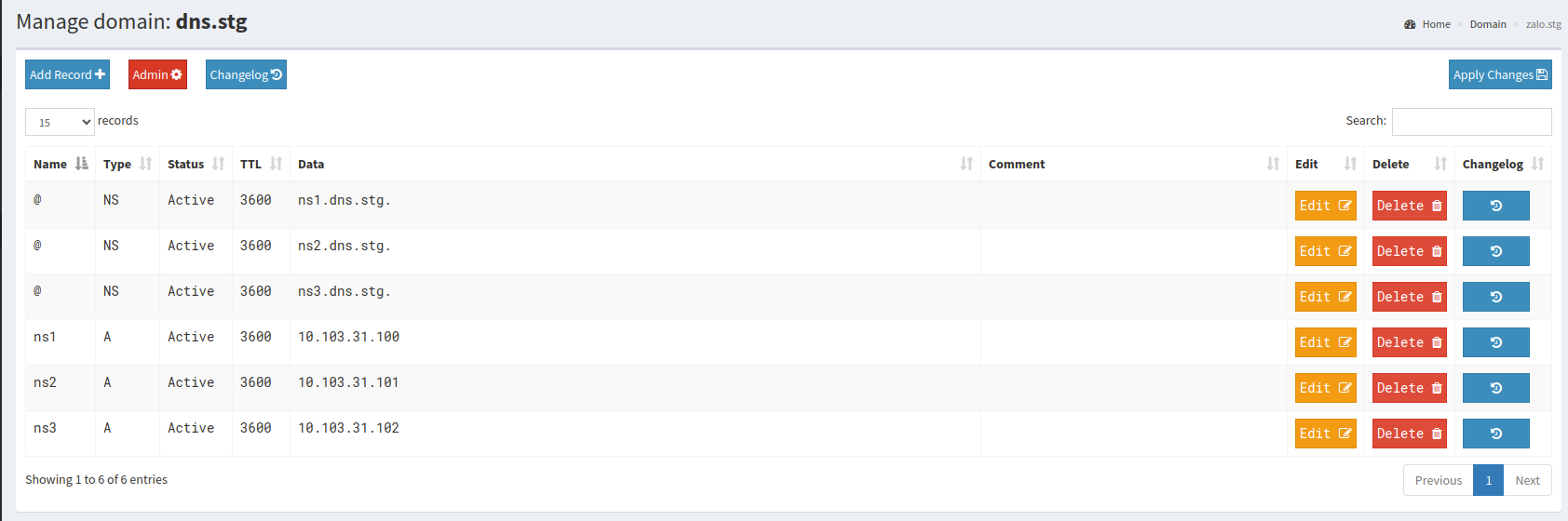
Cài đặt PDNS Recursor
- Tiếp cận từng bước theo Recursor Installation để cài đặt pdns-recursor theo hệ điều hành của mình.
- Config recursor, thay đổi địa chỉ IP và các config khác cho phù hợp
- recursor.conf: file config chính của recursor
# Read allowed IP addresses from a file
allow-from-file=/etc/pdns-recursor/allow
# Enable or disable syslog logging
disable-syslog=no
# Log DNSSEC validation failures as warnings
dnssec-log-bogus=yes
# Specify a file with forward zones
forward-zones-file=/etc/pdns-recursor/forward-zones
# Specify local IP addresses to bind to
local-address=127.0.0.1,10.10.40.103,10.10.40.116,10.10.40.117
# Set the local port for incoming DNS queries
local-port=53
# Set the logging facility and log level
logging-facility=6
loglevel=6
# Maximum number of cache entries
max-cache-entries=1000000
# Maximum Time-to-Live (TTL) for cached items
max-cache-ttl=3600
# Time-to-Live (TTL) for negative cache entries
max-negative-ttl=0
# Allow binding to non-local addresses
non-local-bind=yes
# Enable or disable quiet mode
quiet=no
# Suffix for security poll queries
security-poll-suffix=
# Set the group and user ID for the PowerDNS recursor process
setgid=pdns-recursor
setuid=pdns-recursor
# Number of worker threads
threads=8
- forward-zones: recursor sẽ đi hỏi DNS của các domain được tương ứng với các địa chỉ được cấu hình trong file. Config dưới đây nghĩa là, nếu client yêu cầu resolve domain
dns.stgthì sẽ hỏi các serverpdns Authoritative, còn không thì sẽ trả DNS public (của google và cloudflare)
dns.stg	=10.10.40.111, 10.10.40.112, 10.10.40.102
+.=8.8.8.8, 1.1.1.1
- allow: recursor sẽ chỉ cho các server có IP được quy dịnh đươc resolve domain
127.0.0.0/8
10.0.0.0/8
192.168.0.0/16